Appointments
Timed activities with a date and duration. Repeat them on the weekdays you choose, and get reminded exactly when you want.
 Monendum
Notify me
Monendum
Notify me
Coming soon to iPhone
A calm daily planner for appointments, to-do lists and the things you'll get to anytime.
Monendum
Remember what matters.
Why Monendum
Most planners push. Monendum doesn't. It helps you remember what matters, organize your day, and follow through on your commitments — at a pace that feels like yours. No streaks to protect. Nothing to feel guilty about.
The core idea
Not everything on your mind is the same. Monendum gives each thing the shape it deserves.
Timed activities with a date and duration. Repeat them on the weekdays you choose, and get reminded exactly when you want.
A single task or a full list, with optional reminders. Put a list on Today and the whole list counts as one task — so your progress stays honest.
For the things you'll get to — eventually. Give them a preferred day, never a deadline. They stay out of your progress unless you decide they count.
“Just a preference — never overdue.”— Monendum, on every Anytime task
Priority Alarm
A stronger alarm for important activities. Turn it on for an appointment and Monendum rings full-screen when it's time — with Snooze and slide to stop. Built on Apple's AlarmKit.
Try it — drag the button to stop the alarm.
Important Work Meeting
10:30
Monendum
An interactive recreation of the real Priority Alarm screen.
Make My Day
Turn everything you need to do into a plan. Brain-dump what's on your mind, pick what's already on your day, set a time window — and review a scheduled plan before you accept it.
Illustration of the Make My Day flow.
Today
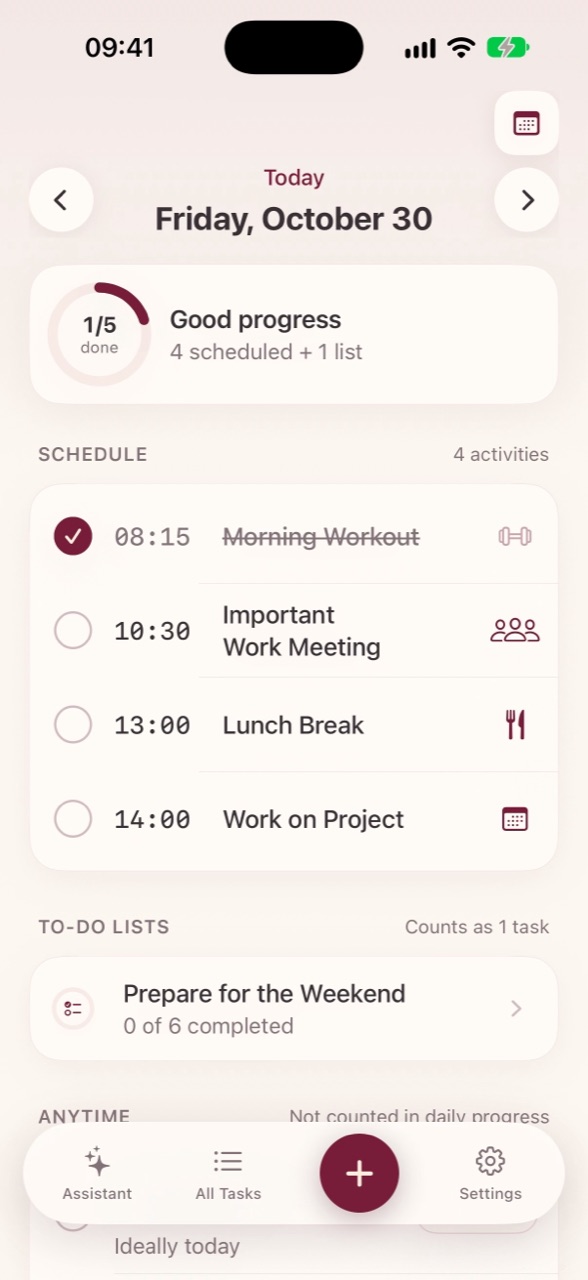
A schedule, a progress ring, your lists and your Anytime things — colour-coded, quiet, and all on one screen.

Just a preference —
never overdue.
That's how Monendum describes an Anytime task. Guilt-free, by design.
Reminders
Set several reminders per activity. Get soft reminders for Anytime things. And an occasional check-in, so nothing you agreed to slips away.
Your data, your call
Your plans are stored on your device. An account is optional — it's there for backup and restore.
Create an account to back up and restore your data.
Guest mode works out of the box. Just open the app and start planning.
English, Nederlands and Deutsch.
Premium
Premium lets you create and edit everything in Monendum. Billed through the App Store.
€34/year
About €2.83 a month — less than half the monthly price.
Notify me at launch€5.99/month
Flexible, month to month.
Notify me at launchWithout Premium, Monendum is read-only. Everything you've added stays visible and safe — you just can't add or change anything.
FAQ
Monendum is in testing right now and coming soon to the App Store. Leave your email and we'll let you know when it's ready.
An iPhone running iOS 18 or later. Monendum is designed for iPhone.
No. Guest mode works without an account. If you want backup and restore, you can sign in with Apple, continue with Google, or use your email.
Monendum becomes read-only. Everything you've added stays visible and safe, but creating and editing activities needs Premium.
To build your plan, the items you pick, your notes and your times are sent to Monendum's server and Google Gemini. They aren't stored or used for anything else.
English, Dutch and German.
Email support@monendum.com.
Monendum is coming soon to the App Store for iPhone. Be the first to know.
Coming soon to the App Store